


Skeddy for Drivers
2.8401.00 Reviews
App Specs
- Version
- 5.17.0
- Updated On
- License
- Free
- Downloads
- 10,000+
- Developer
- Skeddy Technologies Inc.
- Categories
- Auto & Vehicles
- Platform
- Android
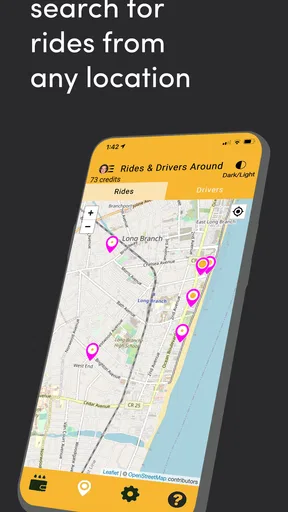
Screenshots
 Analysis by AppCompare
When a driving day fills up with rides, errands, and personal appointments, it is easy to lose track of what comes next. I find that a simple scheduling routine can help, but only if it is quick enough to maintain between trips. Skeddy for Drivers is aimed at that practical problem: keeping a driver’s day organized with schedules and reminders rather than replacing the tools used to navigate or accept work.
A useful baseline for a driver’s day
I would start by treating Skeddy as a planning companion, not as a complete dispatch system. Put the commitments you need to remember in one place, then use reminders to create a little distance between “I need to do this” and the moment it must happen. That can be helpful for a rideshare driver planning around work, or for anyone who needs to coordinate driving with appointments and vehicle care.
A realistic routine might begin the evening before: review tomorrow’s fixed commitments, add a reminder to prepare for the first one, and leave flexible driving time around it. During the day, a prompt can help bring the next task back to mind without relying on a note buried in another app. The benefit is not that the app decides how to run your shift; it is that you can make your own plan easier to follow.
What to check before relying on reminders
Reminder apps are only useful when their timing matches the way you actually work. I would test a few examples while parked before depending on them during a busy day: a prompt for a scheduled pickup, a recurring check you want to remember, and a break reminder. That quick trial helps you see whether your chosen wording and timing are clear enough at a glance.
It also pays to keep reminders specific. “Check the car” is easy to dismiss because it does not say what action matters; a short prompt such as “check fuel before starting” is more actionable. For a task that can be done at different times, choose a reminder that gives you room to respond rather than one that arrives when you are already committed to a trip.
Calendar integration can be useful when personal appointments and driving plans compete for attention. I would use the calendar as the reference for fixed commitments and Skeddy for the prompts that help me act on them, while checking for duplicate alerts if both apps notify me about the same event. That small bit of setup can prevent a helpful reminder from turning into notification noise.
Build repeatable habits, not a crowded schedule
The strongest routine is usually the one you will keep using. Rather than entering every possible task, I would begin with the few items that are genuinely easy to forget: the next commitment, a planned pause, and one vehicle-related check. Once those reminders feel useful, add others selectively. A crowded list can make important prompts harder to notice.
Worth Reading Before You Choose

Baby Panda World Brings Quick Play to Modern Phones, but Its Game Library Feels Busy

ESPN’s Live Game View Makes Following Close Games Easier

QuizzLand Review: A Good Fit for Short Trivia Breaks, Not Every Player

Basketball Stars: Multiplayer Is Fast, but Can It Recover When Matches Go Wrong?

WEBTOON Turns Phone Updates Into a Better Reading Routine

Link to Windows Runs on Shared Habits, Not Social Feeds
For drivers with changing hours, a short end-of-day review is more practical than trying to plan every minute in advance. Check what is still relevant, remove anything that no longer applies, and add only the next day’s firm commitments. This avoids carrying stale reminders forward and keeps the schedule from becoming a record of plans that have already changed.
It is also worth thinking about how much lead time each task needs. A reminder to prepare for an appointment may need to arrive before departure, while a break prompt is more useful when it gives you a chance to choose a safe stopping point. The app can help surface the prompt, but the driver still has to judge traffic, passenger needs, and whether stopping is appropriate.
Where it fits among other driving tools
Skeddy belongs in the organization side of the Auto & Vehicles category. It is not a replacement for a navigation app, a rideshare platform, or a calendar’s full event-management tools. In my view, its role is narrower: helping a driver remember and sequence personal tasks around driving. If your main problem is finding routes or managing bookings inside a work platform, those dedicated tools are the better place to start.
Compared with a paper notebook, reminders can be easier to notice at the right time, while a notebook may feel quicker for free-form notes. Compared with a general calendar, a driver-focused scheduler may feel more aligned with workday routines, but a calendar is often stronger when several people need to share events or when you need extensive event details. I would not move every part of my day into Skeddy; I would use it where a timely nudge is more valuable than a long record.
The developer is Skeddy Technologies Inc. The app is free to install, with in-app purchases listed from $9.99 to $74.99 per item, so I would check the purchase details in the app before deciding whether anything beyond the free use suits my needs. Its Everyone content rating makes it broadly suitable from an age-rating perspective, though the practical question for any driver is whether the workflow fits their own routine.
Who is likely to get the most from it
I can see this being useful for independent drivers who organize their own day and want a straightforward way to remember commitments without building a complicated system. It may also suit someone who drives for several purposes—work, family errands, and appointments—and wants reminders to bridge the gaps between those parts of life.
On the other hand, drivers who already manage everything reliably in a calendar may not gain much by adding another place to check. Someone who expects automatic dispatch, trip tracking, or detailed vehicle diagnostics should look for a tool built specifically for those jobs. A scheduler can support good habits, but it cannot make a changing workday predictable or replace judgment behind the wheel.
Skeddy has an average rating of 2.8 from 714 ratings, with 400 written reviews, and has been installed over 10,000 times. I treat that rating as a reason to try the basic workflow carefully rather than assume it will suit every driver. The app was released on June 17, 2020, and its current version is 5.17.0; it requires Android 8.0 or later. I would check compatibility on the device I plan to use and spend a few days testing reminders before making it part of a time-sensitive routine.
A measured verdict for everyday use
For me, the most sensible way to use Skeddy is as a light layer of structure around a driving day: enter the commitments that matter, make the reminders clear, and review them when plans change. Its value depends less on filling the app with tasks and more on choosing a small set of prompts that genuinely prevent missed steps.
I would recommend giving it a try if you are often switching between driving and other responsibilities and want reminders organized around that rhythm. I would skip it if you need a full business-management system or already have a dependable setup that does the same job. Start with one or two recurring needs, see whether the prompts help without distracting you, and expand only if the habit proves useful.
Driving schedules are rarely perfect, so no reminder app can remove every last-minute change. But a calm, repeatable routine can make the ordinary parts of the day easier to manage. If Skeddy helps you remember what matters while leaving you free to focus on the road, it has earned a place in your toolkit.
Ever find yourself juggling a million things while trying to keep up with your driving schedule? I’ve been there, and let me tell you, it’s no joyride. But then I stumbled upon Skeddy for Drivers, and it’s been a game changer. Let’s dive into what makes this app a must-have for anyone on the go.
What is Skeddy for Drivers?
In a nutshell, Skeddy for Drivers is a scheduling and reminder app designed specifically for drivers. Whether you’re a rideshare driver or someone who’s constantly on the move, this app is your new best friend. It helps you organize your rides, schedule your tasks, and never miss a beat.
User-Friendly Interface
The first thing that struck me about Skeddy was its clean and intuitive interface. You don’t need to be a tech whiz to figure things out. With just a few taps, you can set up your entire week’s schedule. The app is designed to make your life easier, and it really delivers on that promise.
Smart Scheduling
One of the standout features of Skeddy is its smart scheduling capability. It’s like having a personal assistant who never gets tired. You can set reminders for everything from picking up passengers to taking your car for maintenance. And the best part? It sends you notifications, so you’re always one step ahead.
There’s also an option to integrate your calendar, which means you can see all your tasks in one place. No more flipping between apps to figure out your day!
Customizable Reminders
We’ve all been there—forgetting something important because life just got in the way. With Skeddy, that’s a thing of the past. You can customize reminders to suit your needs. Want a heads-up an hour before your next ride? Done. Need a daily reminder to check your fuel levels? Skeddy’s got you covered.
Safety First
What really impressed me was how Skeddy emphasizes safety. The app encourages you to set breaks and reminds you to take them. It’s easy to overlook rest when you’re hustling, but Skeddy ensures you’re not burning out. After all, a well-rested driver is a safe driver.
Seamless Integration
Another feather in Skeddy’s cap is its seamless integration with other apps. Whether you’re using Google Maps or Waze, Skeddy plays nice with them all. It’s like the app knows exactly what you need and when you need it. Talk about being in sync!
Final Thoughts
In a world where time is money, Skeddy is a lifesaver. It takes the stress out of scheduling and lets you focus on what really matters—driving safely and efficiently. If you’re a driver looking to streamline your routine, I’d say give Skeddy a spin. It might just become the co-pilot you never knew you needed.
So, are you ready to take control of your driving schedule? Download Skeddy today and hit the road with confidence!
Pros
- Efficient route optimization saves time.
- User-friendly interface for easy navigation.
- Real-time traffic updates enhance safety.
- Customizable notifications for personal needs.
- Supports multiple languages for global use.
Cons
- Occasional GPS inaccuracies reported.
- Limited offline functionality available.
- Subscription required for premium features.
- Heavy battery usage during long drives.
- Some users find ads intrusive.
FAQs for Skeddy for Drivers
What is Skeddy for Drivers and how does it work?
Skeddy for Drivers is a scheduling app designed specifically for drivers, enabling them to manage their time efficiently. It connects with Google Calendar to automatically organize and update your driving schedule. The app sends reminders and notifications, ensuring you never miss a ride or appointment while optimizing your driving routes.
Is Skeddy for Drivers available on both Android and iOS?
Yes, Skeddy for Drivers is available for download on both Android and iOS platforms. You can find it on the Google Play Store for Android devices and the Apple App Store for iOS devices. Ensure your device meets the minimum system requirements to support the app for optimal performance.
Does Skeddy for Drivers require an internet connection to function?
While Skeddy for Drivers can operate with limited offline functionality, it requires an internet connection for full features, such as syncing with your calendar, receiving real-time notifications, and accessing updated scheduling information. It's best used with a stable internet connection to ensure all features are fully operational.
Can Skeddy for Drivers integrate with other calendar apps?
Currently, Skeddy for Drivers primarily integrates with Google Calendar. This integration allows seamless synchronization of your driving schedule, ensuring all appointments and rides are automatically updated. Future updates may expand compatibility with other popular calendar applications based on user feedback and demand.
Is my data secure when using Skeddy for Drivers?
Yes, Skeddy for Drivers prioritizes user privacy and data security. The app employs encryption protocols to protect your information and follows industry-standard practices to ensure your data remains confidential. Regular updates are implemented to address any security vulnerabilities and improve overall data protection.


